共计 2006 个字符,预计需要花费 6 分钟才能阅读完成。
Slash Commands 是 Claude Code 提供的一项快捷命令,默认情况下 Claude Code 已经自带了非常多的命令,这里就举几个例子,更多可以参考官网
/add-dir增加额外的工作目录,比如在前段项目中可以将后端接口引入进来/cost查看 Token 消耗/doctor检查 Claude Code 安装的健康程度/init非常著名的初始化项目,生成CLAUDE.md文件/mcp管理 MCP/model切换模型/review审查代码/rewind恢复代码或会话
Slash Commands 的主要目的是将自己高频使用的 prompts 以简单的文件方式保存,以便随时可以手动调用。它和下文要介绍的 Skills 有着截然不同的使用思想。
自定义 Slash 命令
Claude Code 可以让用户自定义快捷命令,只需要在 .claude/commands 目录下可以创建 command.md 文件即可。
- 项目级别在
.claude/commands/ - 个人的命令在
~/.claude/commands/
比如创建一个项目级别的命令 /optimize
mkdir -p .claude/commands
echo "Analyze this code for performance issues and suggest optimizations:" > .claude/commands/optimize.md
创建一个个人的命令,所有项目都可以使用
# Create a personal command
mkdir -p ~/.claude/commands
echo "Review this code for security vulnerabilities:" > ~/.claude/commands/security-review.md
Namespacing
我们也可以将命令放到子目录中来创建带有冒号分割的自定义命令。
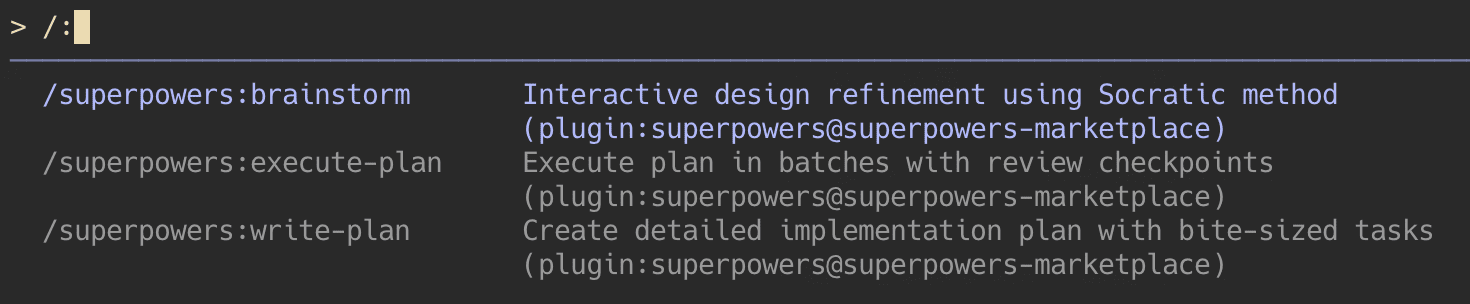
可以在 commands/ 目录下创建 superpowers 文件夹,然后在这个目录下创建 brainstorm.md 这样 Markdown 文件。
定义参数
Slash Commands 可以带参数,所有的参数都会被 $ARGUMENTS 来捕获。比如下面定义的 /fix-issue 的命令,可以带有一个参数,这个参数会被带到 Prompt 中。
# Command definition
echo 'Fix issue #$ARGUMENTS following our coding standards' > .claude/commands/fix-issue.md

# Usage
> /fix-issue 123 high-priority
# $ARGUMENTS becomes: "123 high-priority"
也可以使用 $1 $2 的这样的方式来捕获参数(positional arguments)
# Command definition
echo 'Review PR #$1 with priority $2 and assign to $3' > .claude/commands/review-pr.md

# Usage
> /review-pr 456 high alice
# $1 becomes "456", $2 becomes "high", $3 becomes "alice"
文件引用
在 command.md 文件的描述中,可以直接使用 @ 符号来引用文件。
# Reference a specific file

Review the implementation in @src/utils/helpers.js

# Reference multiple files

Compare @src/old-version.js with @src/new-version.js
文件头
在编写自定义命令的 Markdown 文件的时候,可以有这样一些 YAML Frontmatter
allowed-tools允许的命令argument-hint命令参数的提示description描述model指定模型disable-model-invocation禁止自定义命名使用的 command
比如创建 Git commit message
---
allowed-tools: Bash(git add:*), Bash(git status:*), Bash(git commit:*)
argument-hint: [message]
description: Create a git commit
model: claude-3-5-haiku-20241022
---

Create a git commit with message: $ARGUMENTS
比如审查代码
---
argument-hint: [pr-number] [priority] [assignee]
description: Review pull request
---

Review PR #$1 with priority $2 and assign to $3.
Focus on security, performance, and code style.
正文完